

Automatically create and print shipping labels
Creating and printing shipping labels is tedious and takes up time you should be spending on your online business. With Billbee, you can automate both starting today.
How can I automatically create and print my shipping labels with Billbee?
1. Connect sales channels and shipping providers
If you are just getting started with Billbee, first connect your sales channels and shipping providers. Thanks to our pre-built integrations, this only takes a few minutes.
2. Create a rule for generating shipping labels
Next, set up a rule so that your shipping labels are created automatically. The rule determines when an order is shipped and, consequently, when the shipping label should be generated.
3. Print shipping labels automatically
If you also want to print your shipping labels automatically, you will need cloud printing. This is simply a technology that sends a print job to the cloud, from where it is automatically forwarded to your printer.
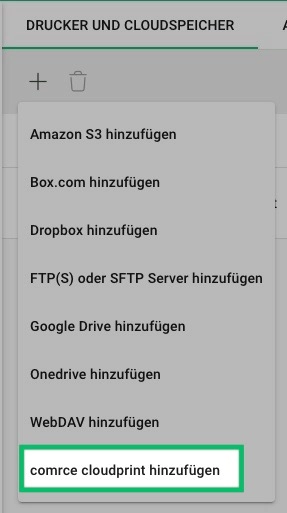
To use cloud printing in Billbee, the best approach is to connect comrce cloudprinting (formerly Druckerwolke). This is a cloud printing service that, like Billbee, is part of the comrce software hub and is free for you as a Billbee user is.
Add comrce cloudprint as a printer and configure it in your shipping settings. This allows you to print shipping labels (and other documents, such as invoices) automatically and directly.
Frequently asked questions about shipping label creation
Which shipping providers does Billbee support?
With Billbee, you can access a wide range of shipping providers including Deutsche Post, DHL, DPD, GLS, Hermes, UPS, and many more. These direct integrations enable you to ship your orders smoothly and efficiently.
Do I need my own printer to print shipping labels?
Yes, comrce cloudprint acts as the bridge between Billbee (software) and your printer (hardware). To print labels automatically, you need a printer connected to comrce cloudprint and configured in your shipping settings.
How much does Billbee cost?
Billbee uses a usage-based pricing model: you pay a €9 monthly base fee plus a small amount per order. The base fee includes shipping label creation as well as all other features. This allows you to automate your shipping and many other e-commerce processes.
Is the information added to the shipping label automatically?
Yes, Billbee automatically transfers the order data required for shipping to your shipping providers.
Does Billbee also create return labels?
Yes, Billbee can also create return labels for major shipping providers (DHL, Hermes, DPD, and GLS) to include with your shipments. The return labels are then printed automatically along with the shipping label.