

Payment reconciliation
Manually checking incoming payments and matching them to the correct orders is time-consuming. Furthermore, manual reconciliation is prone to errors. With Billbee, this process runs fully automatically in the background. This not only saves hours of work, but also prevents mistakes and gives you a clear overview at all times of which orders have been paid and which are still outstanding.
How does automatic payment reconciliation work with Billbee?
- Import orders: Billbee automatically imports all orders from all your sales channels.
- Import incoming payments: The system also imports all incoming payments. You can trigger the import manually or let it run fully automatically in the background.
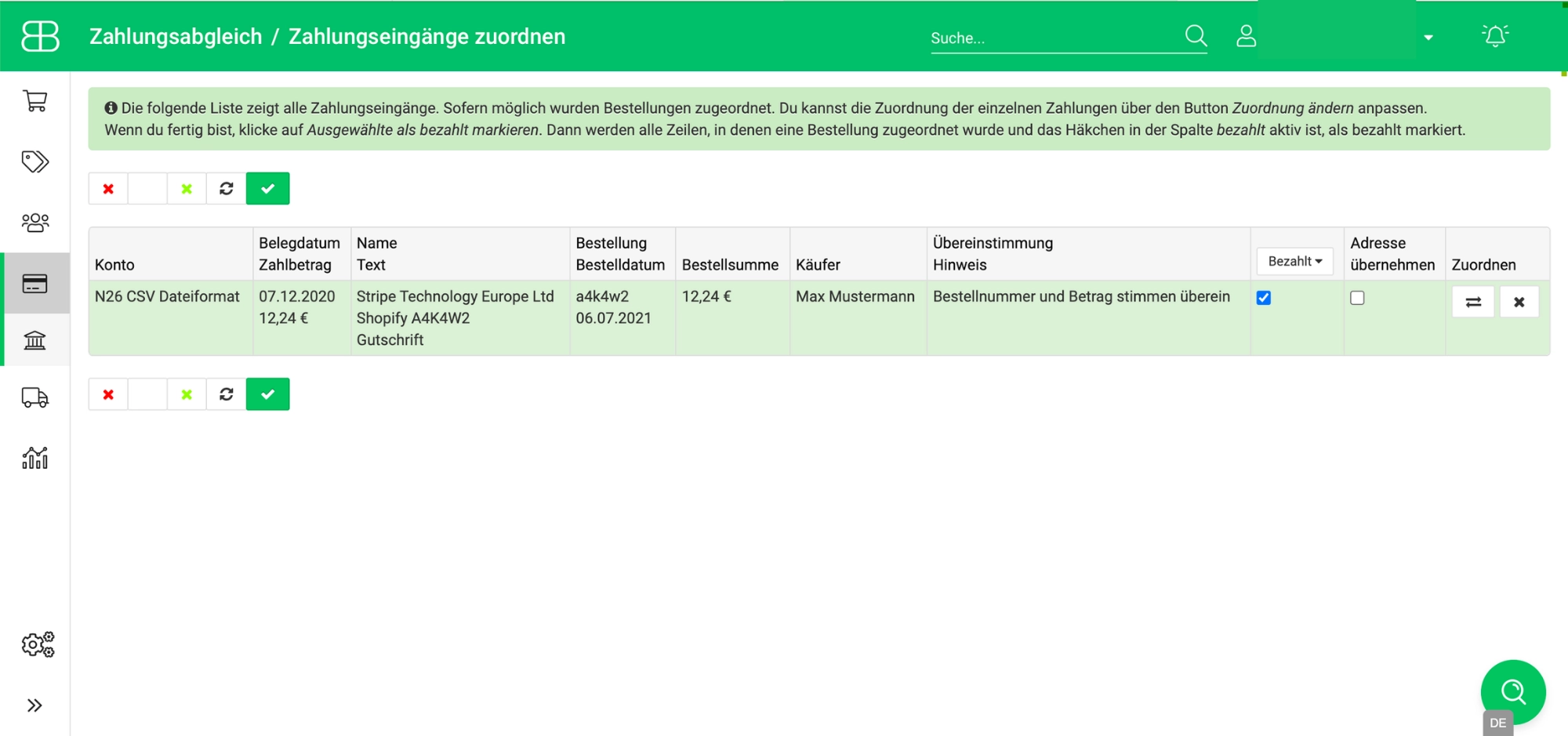
- Match orders and payments: Billbee finds the corresponding order for every payment and links them together. You can manually match any payments that cannot be assigned automatically.
- Mark orders as paid: Once Billbee successfully matches an order and payment, the system automatically marks the order as "Paid." This saves you an extra click as well.
- Automatically notify customers: If you wish, Billbee can also send a message directly to your customers to inform them that their payment has been received—ensuring the entire payment reconciliation process is fully automated from start to finish.
Which payment providers does Billbee support?
Billbee can import payments from all major payment providers :
- PayPal: PayPal provides an API (Application Programming Interface) that allows Billbee to import sales data, including transaction IDs and fees. Billbee then identifies the corresponding orders and automatically matches the payments.
- Amazon Pay: Connect Amazon's payment service directly to your Billbee account. This allows you to keep track of your incoming payments without any extra manual effort and lets Billbee handle the reconciliation for you.
- Klarna: If you use Klarna for transactions with your customers, Billbee can also import and match payments from your Klarna account.
- Stripe: By connecting your Stripe account to Billbee, sales data can be retrieved and reconciled with your orders.
- Shopify Payments: If you use Shopify Payments to accept payments, you can connect Billbee directly and automate payment reconciliation for all payment methods.
- Mollie: Even if you use Mollie for payment processing, you can have your payments automatically reconciled with Billbee to save time.
- Bank account: To reconcile payments from bank accounts with the corresponding orders, Billbee uses the service provider FinApi. Most banks and savings banks in Germany and Austria offer an interface that FinApi can access.
Your data is always secure
Billbee only requests the permissions strictly necessary to import your sales data. While the system must store your PIN for HBCI access, it is securely encrypted and therefore protected from unauthorized access. This ensures that payment transactions cannot be executed under any circumstances.
Your data is easy to process further
Your payment information is stored in Billbee so that it remains available for future use. For example, you can use your Prepare your bookkeeping with ease and simply generate a DATEV export for your accountant or transfer your data fully automatically to DATEV using the DATEV booking data service.
Frequently asked questions about automatic payment reconciliation
What does payment reconciliation mean?
Payment reconciliation involves checking all incoming payments – for example from bank accounts, PayPal, Klarna, or Stripe – and matching them to the corresponding orders. If the payment amounts and other data match, the order is automatically marked as "Paid." This means you no longer have to manually compare incoming payments with order numbers and amounts.
What are the advantages of automatic payment reconciliation?
Automatic payment reconciliation saves not only time, but also reduces errorsthat can easily occur during manual reconciliation. You always keep track of outstanding items, can automatically trigger follow-up actions such as shipping or invoicing, and save yourself the hassle of scouring through bank statements.
How can I get started with Billbee and automate payment reconciliation?
Getting started with Billbee is easier than you might think: create your account, connect your sales channels, and add your accounts (bank account, PayPal, Amazon, etc.). Then, decide whether you want payment reconciliation to be handled manually via CSV or fully automatically. From there, Billbee takes care of the payment reconciliation for you.
Who benefits from automatic payment reconciliation?
Automatic payment reconciliation is worthwhile for all online retailerswho want to stop tracking incoming payments manually and keep their order status up to date at all times – without any manual follow-up.
Which shop systems and marketplaces does Billbee support?
Billbee supports all major shop systems (Shopify, WooCommerce, Shopware, Magento, and many more) as well as all popular marketplaces (eBay, Amazon, Kaufland, OTTO Market, Etsy, and many more). No matter where you sell, Billbee automates payment reconciliation across all your sales channels.